
HOT IPTV Instructions for your specific device
Instructions for HOT IPTV
HOT IPTV is the most advanced version of the apps and is relatively easy to get started with. To upload your playlist, you need to visit their website and do it via the following link: https://hotplayer.app/upload.
The app allows you to upload your channels in the following ways:
M3U link
Xtream Codes Playlist (login credentials)
MAG/Stalker Portal
It is recommended that you upload your IPTV playlist using Xtream Codes (with the login credentials you receive from us upon purchase or free trial). This way, your EPG (program guide) is installed automatically in the background.
If you instead choose M3U, you must manually enter your EPG link, which you will receive from us. The Pro version is available for certain Smart TVs and Android devices. Unfortunately, it is not available for Apple devices, as the apps are specifically created for Android-based devices.
Duplex IPTV Instructions
Duplex IPTV is a very simple app to use and get started with. The app allows you to upload your channels via an M3U link on their website: https://edit.duplexplay.com/
Duplex IPTV (Duplex Play) is one of the most downloaded IPTV apps after Smart IPTV. However, for some reason, it is not available for Apple devices.

Step 1
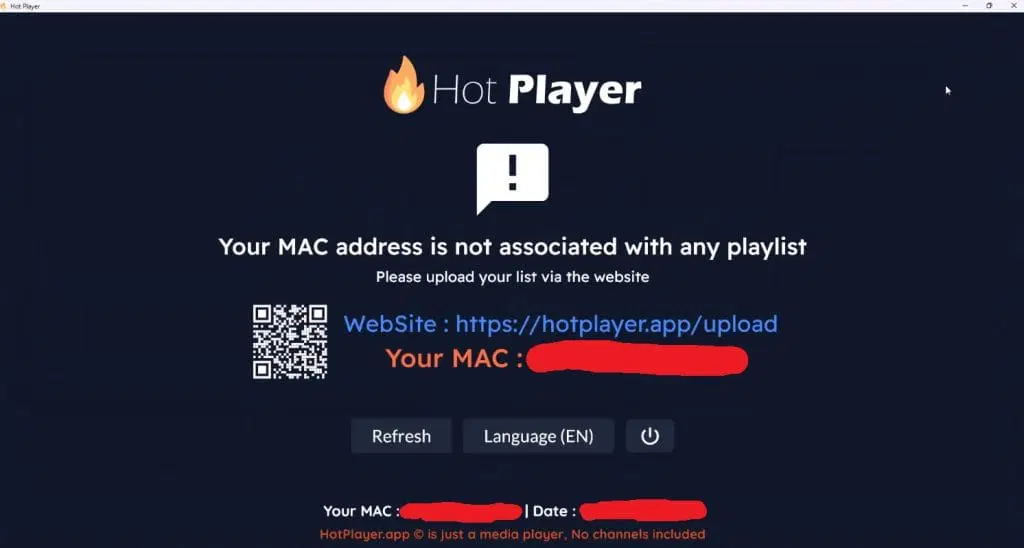
Open the app and note your MAC address, which is displayed in the center of the box in orange text.
Step 2
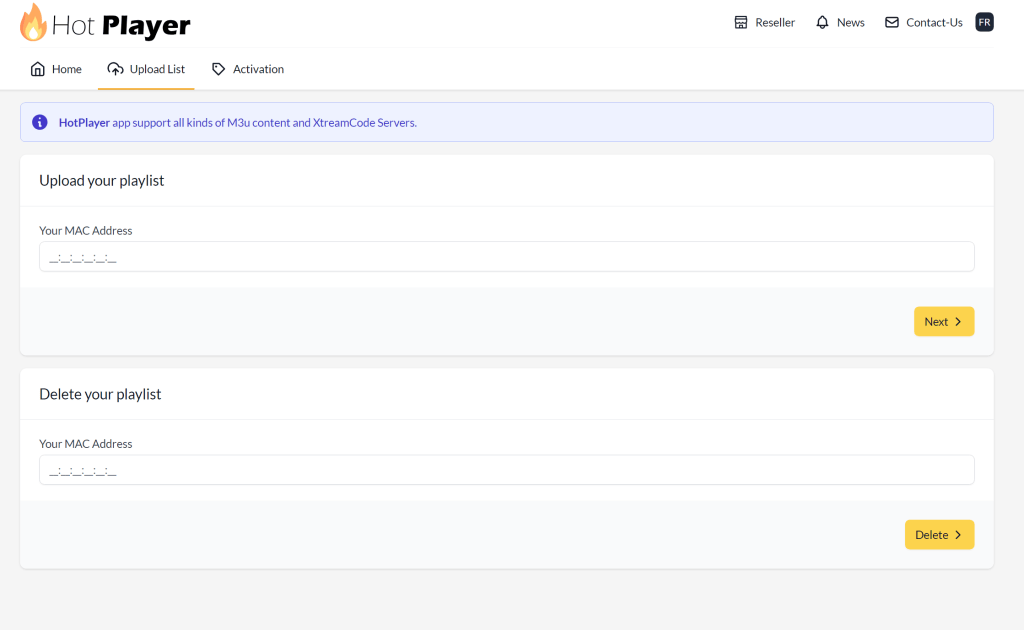
Visit https://hotplayer.app/upload and enter your MAC address in the “Your MAC Address” field under the “Upload your playlist” tab. Then click “Next”.
Step 3
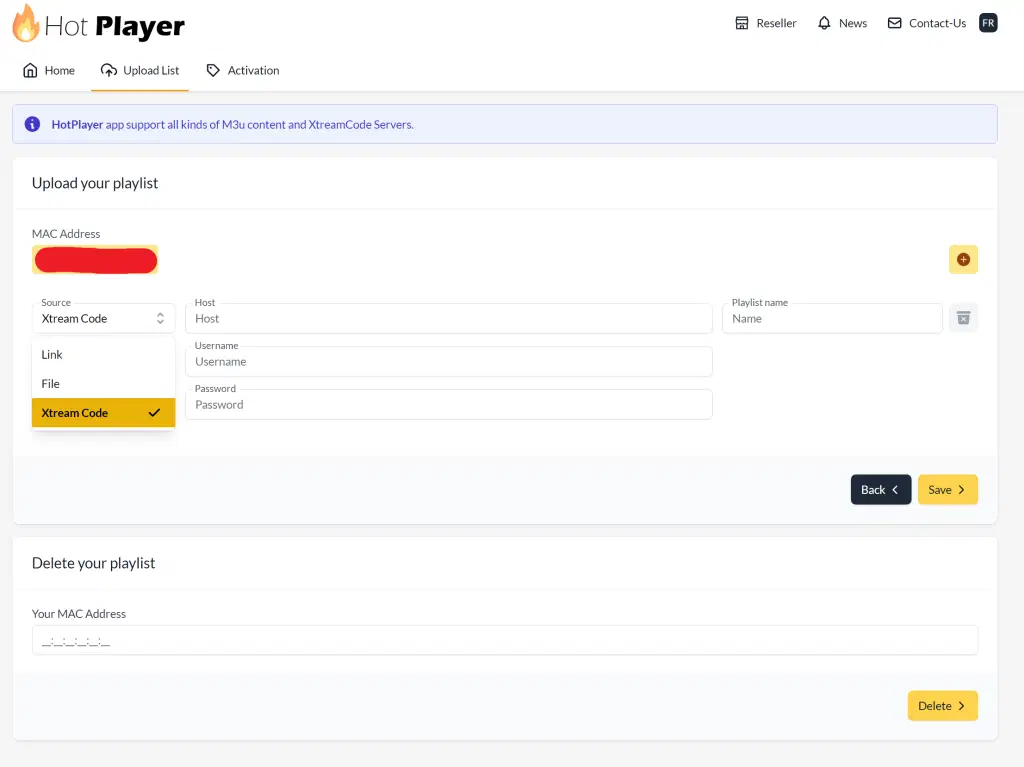
In the “Source” field, select “Xtream Code”.
In the “Host” field, enter your portal URL that you received together with your login details in our welcome email.
In the “Playlist name” field, enter “svenskiptv.com”.
Click “Save” and then reload the app on your box/TV.
Step 4
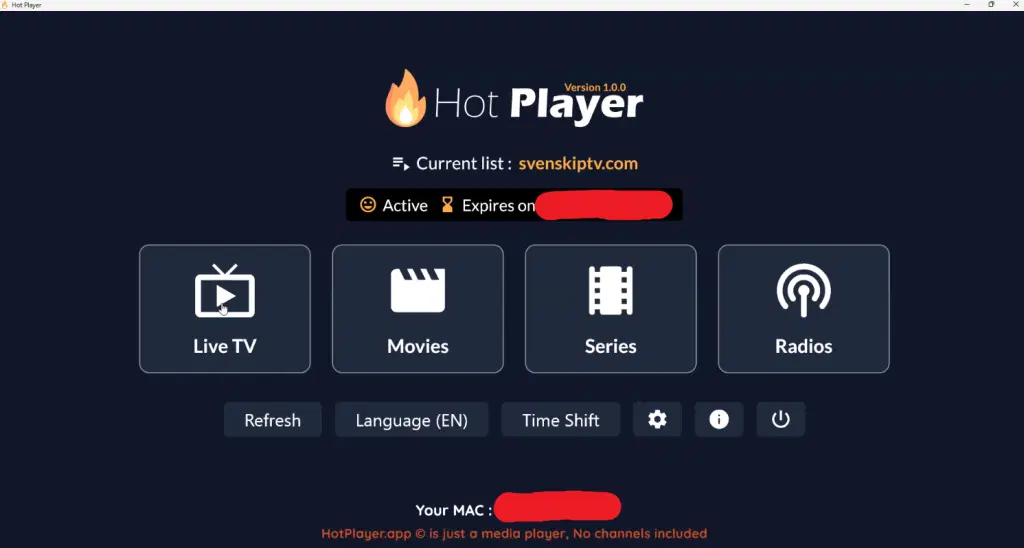
Done! 🙂
Where can I download the app?
The app can be downloaded from both the Play Store and the Microsoft Store.
APK files are also available, but we recommend avoiding them as many may contain viruses.
However, the APK file from HOT IPTV’s official website is safe to download.
Which devices can I use?
Smart TV
HOT IPTV with Smart TV is a good option for those who have experience with IPTV apps. The app works well with Smart TV devices such as LG, as well as other brands like Samsung, Sony, and Philips. Since it is possible to install IPTV Extreme Pro and many other apps, Smart TVs—especially LG—are devices that can be used for IPTV viewing. However, it is recommended to remove unnecessary apps and use a somewhat newer model, as many IPTV playlists today are very large and contain hundreds of thousands of channels, movies, series, documentaries, and more.
HOT IPTV is a popular Smart TV app that gives users access to a huge selection of IPTV channels, movies, and series in high quality. The app is designed to work smoothly on Smart TV devices and offers a user-friendly experience with fast navigation and easy channel management. With support for HD and 4K resolutions, you can enjoy crystal-clear picture quality and stable streaming, enhancing your TV viewing experience. HOT IPTV also supports EPG (Electronic Program Guide), making it easier to keep track of programs and channels.
The app runs smoothly on TVs and is designed to deliver the best performance on Smart TV systems, Android TV, Android boxes, and mobile devices. The app is available on most LG, Sony, Samsung, and Philips TVs that use Android-based systems. Although the app works well with your device, it is recommended instead to use a more advanced app, such as for example Tivimate, for a better experience.
Specifications for HOT IPTV
- App: Extreme IPTV Pro
- Installation time:
- Approximately 7 minutes
- Wi-Fi/Cable: Supports
- both
- Cost: 29 SEK
- Free trial available: Yes
Computer
HOT IPTV on computer is an excellent choice for those who have experience with IPTV apps and want a high-quality experience. HOT IPTV Player for computers offers a comprehensive entertainment service with access to thousands of IPTV channels, movies, and series in top quality. The app is user-friendly and intuitive, making it easy to navigate between different channels and content.
With support for HD and 4K resolutions, you can enjoy crystal-clear picture quality on your computer. Streaming is smooth and uninterrupted, ensuring a great viewing experience. HOT IPTV Player also includes EPG (Electronic Program Guide), allowing you to easily plan your viewing and keep track of your favorite programs.
The app’s flexibility makes it compatible with a wide range of IPTV services, making it a reliable and practical option for IPTV streaming. Whether you want to watch sports, news, movies, or series, HOT IPTV Player is an ideal solution for maximizing your IPTV experience on a computer.
HOT IPTV – Instructions
Step 1
Start the app and note your MAC address, which is displayed in the middle of the screen in orange text. This address is required to configure your IPTV.
Step 2
Visit: https://hotplayer.app/upload and enter your MAC address in the “Your MAC Address” field under “Upload your playlist”. Then click “Next”.
Step 3
Select “Xtream Code” in the “Source” field and enter your portal URL from our welcome email in the “Host” field.
Enter “svenskiptv.com” in the “Playlist name” field, press “Save”, and then reload the app on your box/TV.
Step 4
Done! 🙂
You are now ready to start enjoying the IPTV channels on your device.
Nvidia Shield
HOT IPTV with Nvidia Shield is a good option for IPTV, but there are better solutions to consider. The app is designed to work best with Android-based systems and delivers solid performance on the Shield device.
HOT IPTV is a high-performance app for Nvidia Shield, created to provide users with a premium IPTV experience. With a wide selection of TV channels, movies, and series in HD and 4K, the app takes full advantage of the powerful Nvidia Shield hardware to deliver fast and stable streaming. The user-friendly design and simple navigation make it easy to find and stream your favorite channels. The app also supports EPG (Electronic Program Guide), making it easier to plan and manage viewing schedules. HOT IPTV delivers a premium experience for users seeking high-quality IPTV streaming on their Nvidia Shield device.
Although the app works well with your device, it is recommended to use a more advanced app, such as Nanomid, for a better user experience.
Android Box
HOT IPTV with Nvidia Shield is a good option for IPTV, but there are better solutions to consider. The app is designed to work best with Android-based systems and delivers solid performance on the Shield device.
HOT IPTV is a high-performance app for Nvidia Shield, created to provide users with a premium IPTV experience. With a wide selection of TV channels, movies, and series in HD and 4K, the app takes full advantage of the powerful Nvidia Shield hardware to deliver fast and stable streaming. The user-friendly design and simple navigation make it easy to find and stream your favorite channels. The app also supports EPG (Electronic Program Guide), making it easier to plan and manage viewing schedules. HOT IPTV delivers a premium experience for users seeking high-quality IPTV streaming on their Nvidia Shield device.
Although the app works well with your device, it is recommended to use a more advanced app, such as Nanomid, for a better user experience.
Formuler Box
HOT IPTV with Formuler Box works fairly well as an initial solution, but the Formuler Box is a more unique Android device that comes with its own IPTV app, MyTVOnline. The MyTVOnline apps are better optimized for use with Formuler devices and provide a better IPTV experience than HOT IPTV.
Therefore, it is recommended to use the MyTVOnline apps instead of HOT Player.


