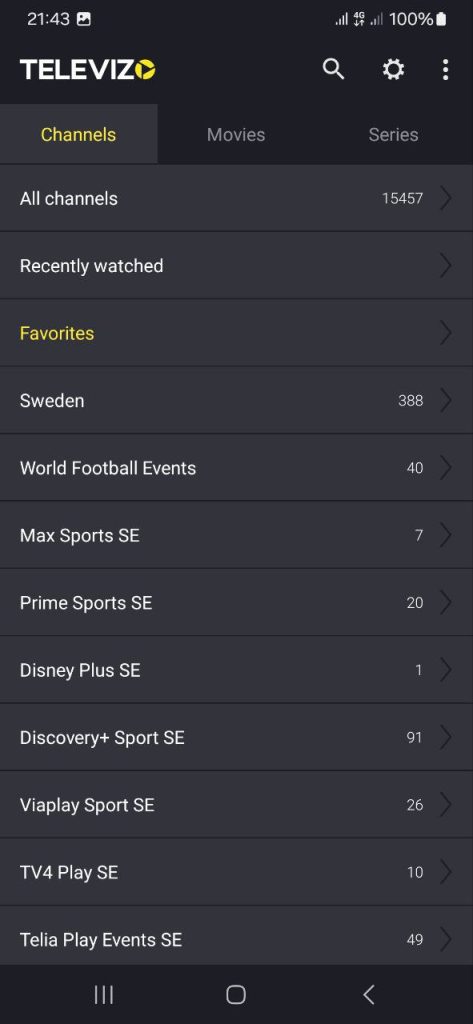
Televizo IPTV Player instructions for your specific device
Instructions for Televizo IPTV Player
Televizo IPTV Player is a relatively new app that is available on several different devices and is easy to get started with. You only need to enter your login details directly in the app, which means you do not need to upload your playlist via their website, as is common with other apps.
The app allows you to upload channels in two ways:
- M3U link
- Xtream Codes Playlist (login details)
It is recommended to upload the IPTV playlist via Xtream Codes, as this automatically installs the EPG (program guide) in the background. If you choose to use the M3U link instead, you must manually enter the EPG link that you receive from us.

Step 1
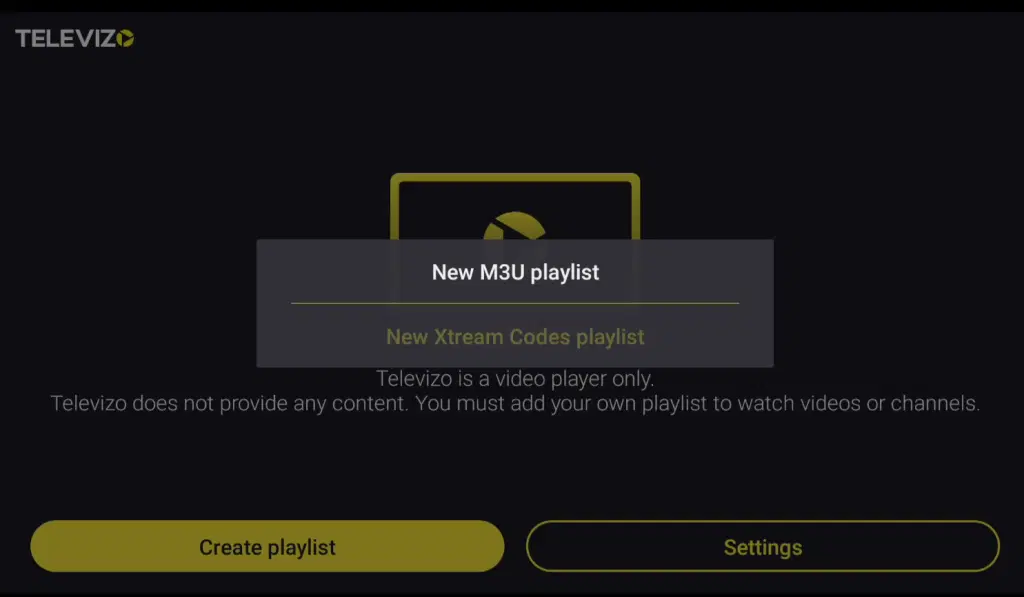
Start the app. Then tap “Create playlist” and select “New Xtream Codes playlist”.
Step 2
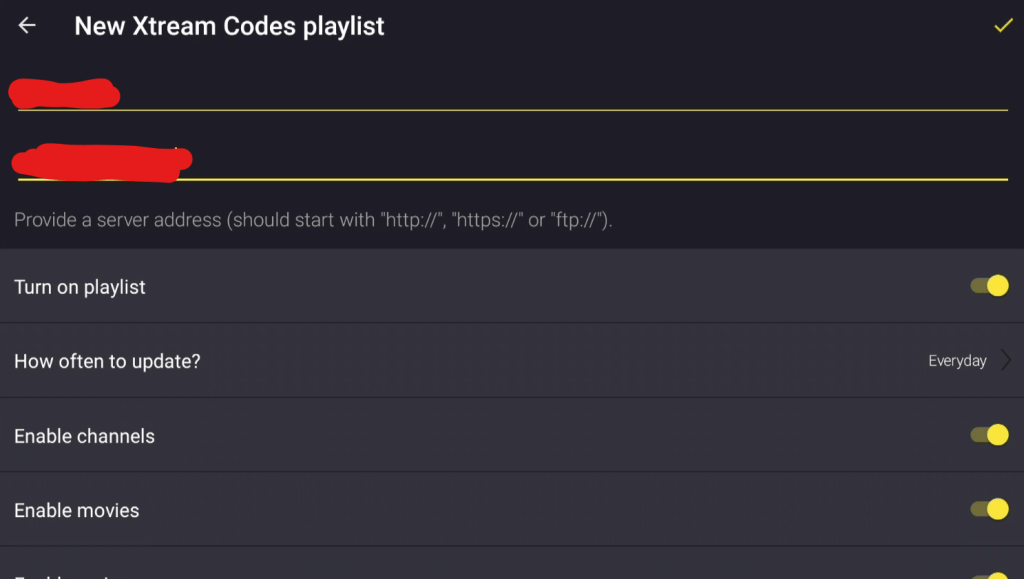
Enter your login details that you received from us. When you’re finished, press the back button. When prompted to save the playlist, tap “Yes”.
Step 3
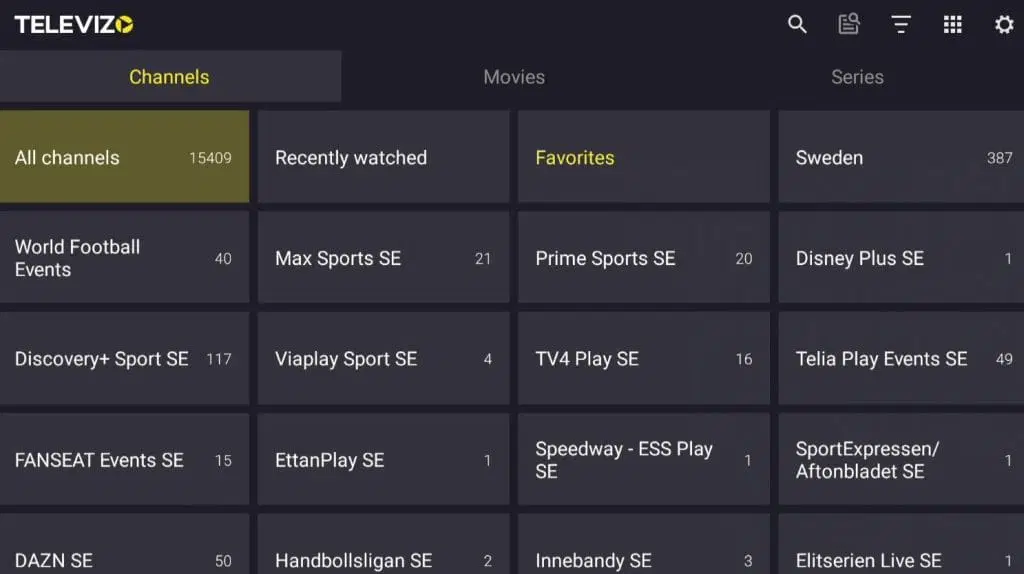
Done! 🙂
Where can I download the app?
The app can be downloaded from the Play Store or via the “store” on your TV. APK files are also available for download, but these should be avoided as they may contain viruses. However, the APK file from Televizo IPTV Player’s official website is safe to download.
Which devices can I use?
Smart TV
Televizo IPTV Player with Smart TV is an excellent solution for beginners who want to get started with IPTV. The app works well with Smart TVs from LG, as well as other brands such as Samsung, Sony, and Philips. For the best experience, we recommend using a newer TV model and removing apps you don’t use, as today’s IPTV playlists are often large and contain hundreds of thousands of titles, such as channels, movies, series, and documentaries.
Televizo IPTV Player is a powerful app that gives Smart TV users access to a wide range of IPTV channels and on-demand content. With easy installation and fast navigation, you can enjoy HD or 4K streaming depending on your internet connection. The app also includes an EPG (Electronic Program Guide) for better channel management and planning.
Although Televizo IPTV Player is a good app, it is recommended to consider an app like Tivimate for an even more stable and better user experience.
Specifications for Televizo IPTV Player
- App: Televizo IPTV Player
- Installation time: Approx. 5 minutes
- Wi-Fi/Cable: Supports both
- Cost: 149 SEK
- Free trial available: Yes
Mobile
Televizo IPTV Player on mobile is an excellent choice for IPTV viewing on your phone. The app works smoothly on both Android and iOS devices and takes advantage of the phone’s performance to deliver a fast and stable experience. You can easily stream thousands of channels, movies, series, and documentaries directly on your mobile device, allowing you to take your entertainment with you wherever you go. For the best results, a stable internet connection is recommended, along with clearing unnecessary apps to optimize performance.
The app offers a user-friendly experience with simple installation and fast navigation. It supports various formats and resolutions for high-quality streaming, whether you are watching in HD or 4K. Televizo IPTV Player also includes an EPG (Electronic Program Guide) for easy channel management and scheduling.
However, there are better alternatives available for mobile devices, such as for example
IPTV Smarters. If you are using an iPhone, we instead recommend the app
Tablet
Televizo IPTV Player on a tablet works better than on a mobile phone if you want to get started on your Android-based tablet. The app provides a solid IPTV experience and is a good option for watching TV while on the go. If you are using an iOS device (iPad), we instead recommend the app IPTVX.
Televizo IPTV – Instructions
Step 1
Start the app and tap “Create playlist”. Then select “New Xtream Codes playlist”.
Step 2
Enter your login details that you received from us. When you are done, press the back button. When prompted to save the playlist, tap “Yes”.
Step 3
Done! 🙂
Follow the instructions and select your desired playlist. Enter the details you received from us and save.
Nvidia Shield
Televizo IPTV Player with Nvidia Shield is an excellent solution for IPTV viewing. The app runs smoothly on Nvidia Shield and takes full advantage of the device’s powerful hardware to deliver a fast and stable experience. Nvidia Shield is one of the best devices for IPTV streaming thanks to its high performance and support for multiple apps, including Televizo IPTV Player. For the best experience, we recommend keeping your Nvidia Shield up to date and removing unnecessary apps to ensure optimal performance—especially when using large IPTV playlists that may contain hundreds of thousands of channels, movies, series, and documentaries.
Televizo IPTV Player gives Nvidia Shield users access to a wide selection of IPTV channels, movies, and series. The app is easy to install and offers a user-friendly experience with fast navigation and high-quality streaming. With support for various formats and resolutions, you can enjoy content in both HD and 4K, depending on your internet connection. The app also includes an EPG (Electronic Program Guide) for easy channel management and scheduling.
Android Box
Televizo IPTV Player with Android Box is an excellent choice for IPTV streaming. The app runs smoothly on Android Box devices and utilizes the device’s powerful performance to deliver a fast and stable IPTV experience. Android Box is a popular platform for IPTV viewing thanks to its flexibility and the ability to install apps such as Televizo IPTV Player. To ensure optimal performance, we recommend keeping your Android Box updated and removing unnecessary apps, especially when handling large IPTV playlists with thousands of channels, movies, series, and documentaries.
Televizo IPTV Player provides Android Box users with a powerful solution to access a wide selection of IPTV channels, movies, and series. The app is easy to install and offers a user-friendly experience with fast navigation and high-quality streaming. With support for various formats and resolutions, you can enjoy content in HD and 4K, depending on your internet connection. The app also includes an EPG (Electronic Program Guide) for easy channel management and scheduling. Televizo IPTV Player is an excellent choice for users who want to maximize their IPTV experience.
Although the app works well on Android Box, it is recommended to use a more advanced app such as Tivimate, as it offers a better interface and more stable servers.
Xiaomi Mi
Televizo IPTV Player with Xiaomi Mi S Box or Xiaomi Mi Stick is unfortunately not the best option for IPTV viewing, especially when compared to devices such as Apple TV. The reason is that the processors in both devices are not as powerful. It is of course possible to watch IPTV on Xiaomi Mi devices, and the experience can still be good. However, if you are looking for a more stable and smoother solution, these devices are not the best choice.
Formuler Box
Televizo IPTV Player with a Formuler Box works fairly well, but the Formuler Box is a more specialized Android box that comes with its own IPTV app, MyTVOnline. The MyTVOnline apps are significantly better than Televizo IPTV Player and the Extreme app, so it is recommended to use them instead for a better and more stable experience.
Televizo IPTV – Instructions
Step 1
Launch the app and tap “Create playlist”. Then select the option “New Xtream Codes playlist”. Follow the instructions to add your playlist.
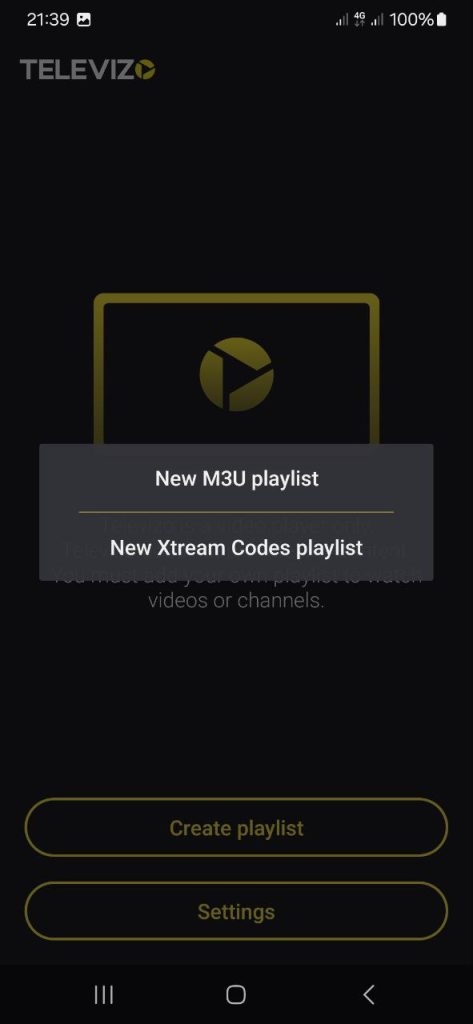
Step 2
.Then enter the login details you received from us. When you are done, tap the yellow checkmark in the top-right corner. If that does not work, press the back button. When you are prompted to save the playlist, tap “Yes”.
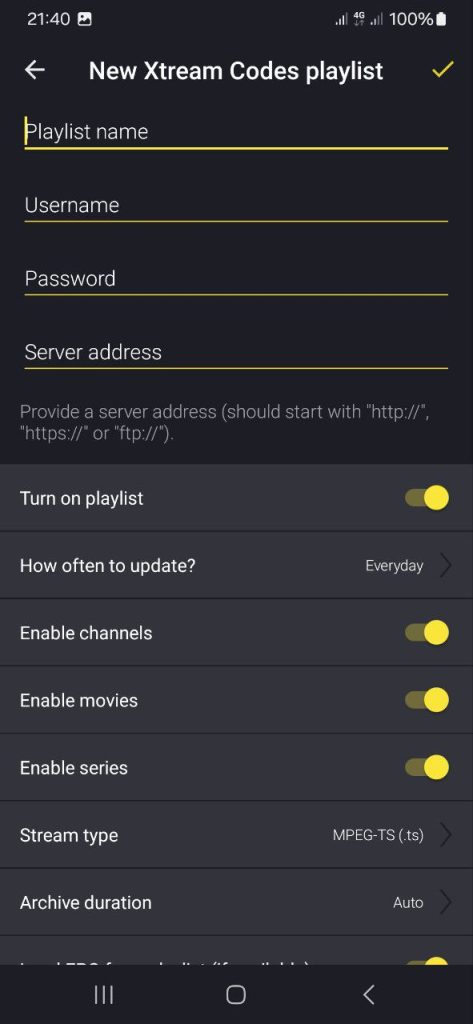
Step 3
Done!
Your playlist is now saved and active.
Select your IPTV playlist in the app to get started.
Start watching channels, movies, and series instantly.